🏪 Shop owners
A Business Space — set up your shop's page
What it is #
A Business Space is a Space for a shop, café, salon or clinic. Its Home is made for customers: whether you are open now, buttons to LINE, Call and get Directions, your address with a small map, your opening hours, then your Events, Polls and Announce cards. A link at the bottom says which town you belong to ("Part of Plaazaa Town").

On a phone the same block is one column, with the three buttons side by side:
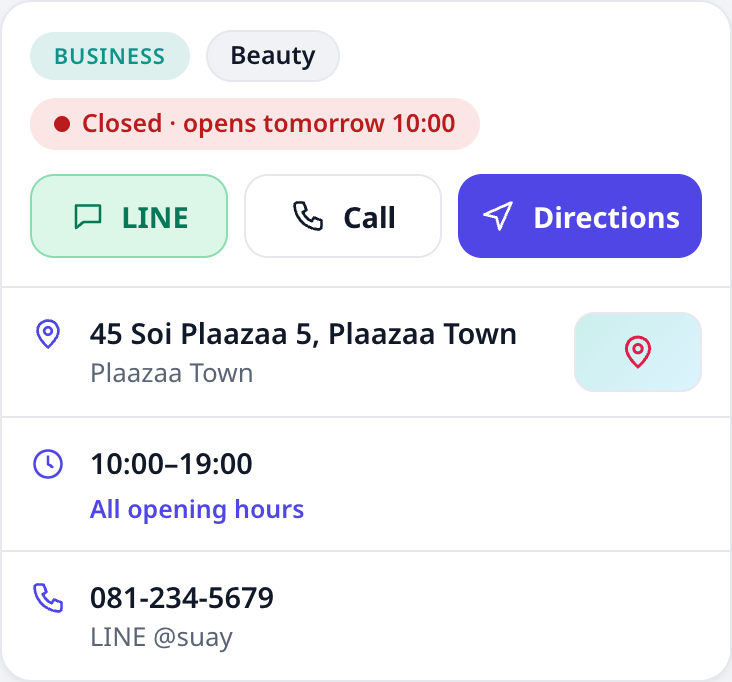
A normal (city) Space does not change. Plaazaa staff set a Space to Business and the town it belongs to — you cannot switch the type yourself. Ask Plaazaa to make your Space a Business Space.
Fill in your business info #
Who: the Space owner and admins. Open the Space, press ⋯ Manage → Business info.
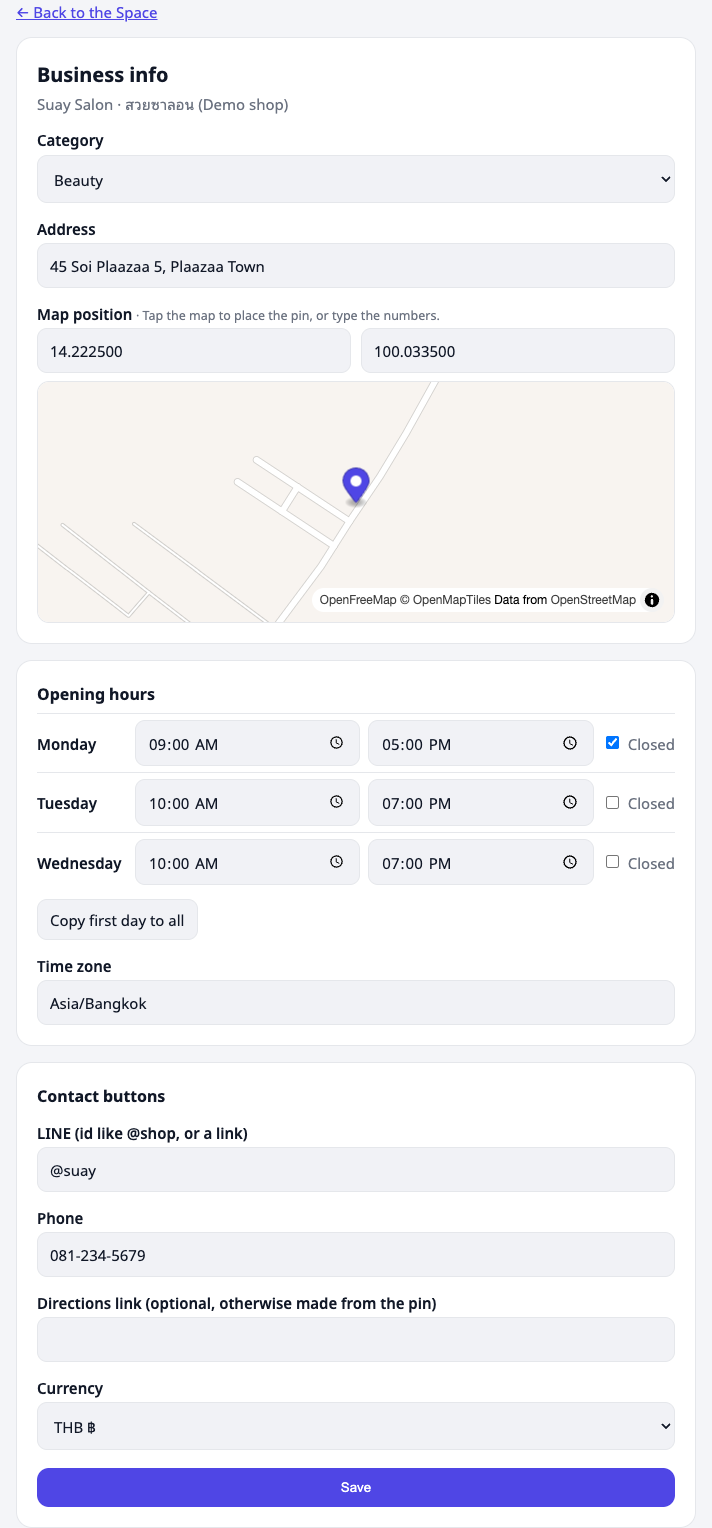
| Field | What it does |
|---|---|
| Category | Café, Food, Beauty, Grocery, Wellness or Fitness. Shown as a chip. |
| Address | Shown in the Home block. |
| Map position | Tap the map to drop the pin (drag it to adjust), or type latitude and longitude. Customers tap the small map chip to see the map. |
| Opening hours | One opening and closing time per day. Tick Closed for a day off. Copy first day to all fills every day. |
| Time zone | Leave it as Asia/Bangkok in Thailand. "Open now" is worked out in this zone. |
| LINE | Your LINE id (like @myshop) or a link. Makes the green LINE button. |
| Phone | Makes the Call button (tap to call on a phone). |
| Directions link | Optional. If empty, Directions opens a map route to your pin. |
Press Save. The Home block updates at once.
💡 A button only appears when its field is filled in. No phone number, no Call button.
Open now #
The chip shows Open now · closes 18:00, or Closed · opens tomorrow 10:00. It follows your opening hours automatically — no need to change anything on a holiday morning, but remember to untick the days you really close.
Edit the cards below #
⋯ Manage → Edit Home works as in any Space: switch Events, Polls and Announce on or off, move them, pick who sees them. City cards (Reports, Notices, Popular, weather) are not offered on a Business Space.
⋯ Manage → Tools shows tools that are coming soon (Book, Market) and the switch to show them on your Home.
Perks & card #
If the shop uses Plaazaa Loyalty, its Home shows a Perks & card block above the menu:
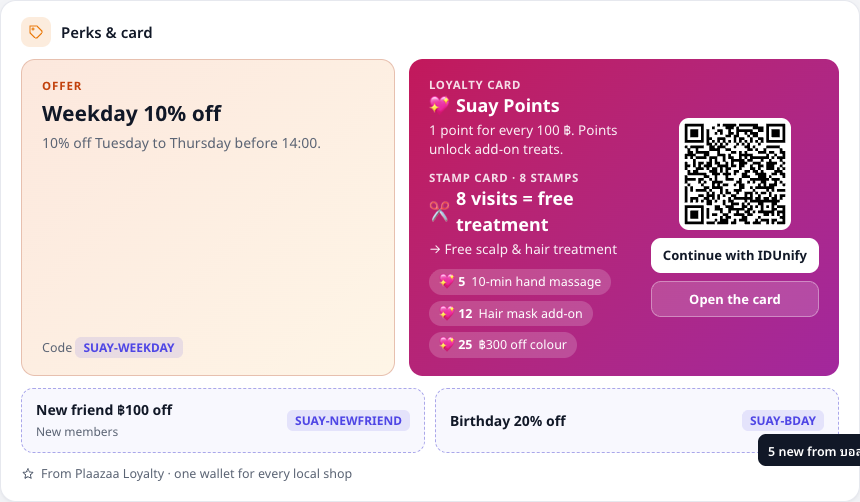
- Offer — the shop's current public offer (for example "Happy Hour 20% off") and its code.
- Loyalty card — what the card earns (for example 1 Star per ฿10), the stamp card if there is one, and the first rewards (what the Stars buy).
- Join — a QR code and Continue with IDUnify open the card page so a customer can join free. Customers who are not signed in see exactly the same; nothing about a person is shown here.
- Vouchers — other public vouchers as small tiles (new-member vouchers are marked).
The block is read only: the shop changes offers, rewards and cards in Plaazaa Loyalty, and this block follows within minutes. It is refreshed every 7 minutes; if Loyalty cannot be reached the last good data stays on screen with Last updated … ago once it is older than 20 minutes — it never turns into an empty box. A shop that is not linked, or has nothing public, simply shows no block.
In the town's Local shops list, each shop tile can show its current offer as a small orange badge.
🔒 Linking a shop to Loyalty is done by Plaazaa staff (Business info → Plaazaa staff → Loyalty partner id, card ids). The access key stays on the server and is never shown on the page.
Menu / Services list #
Add what you sell so customers see it on your Home. The block is called Menu (café, food), Services (beauty, wellness, fitness) or Products (grocery), from your category.
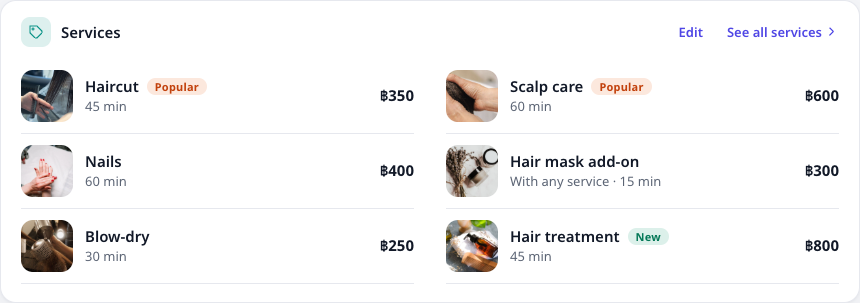
Open ⋯ Manage → Menu (or Services). The owner and admins can:
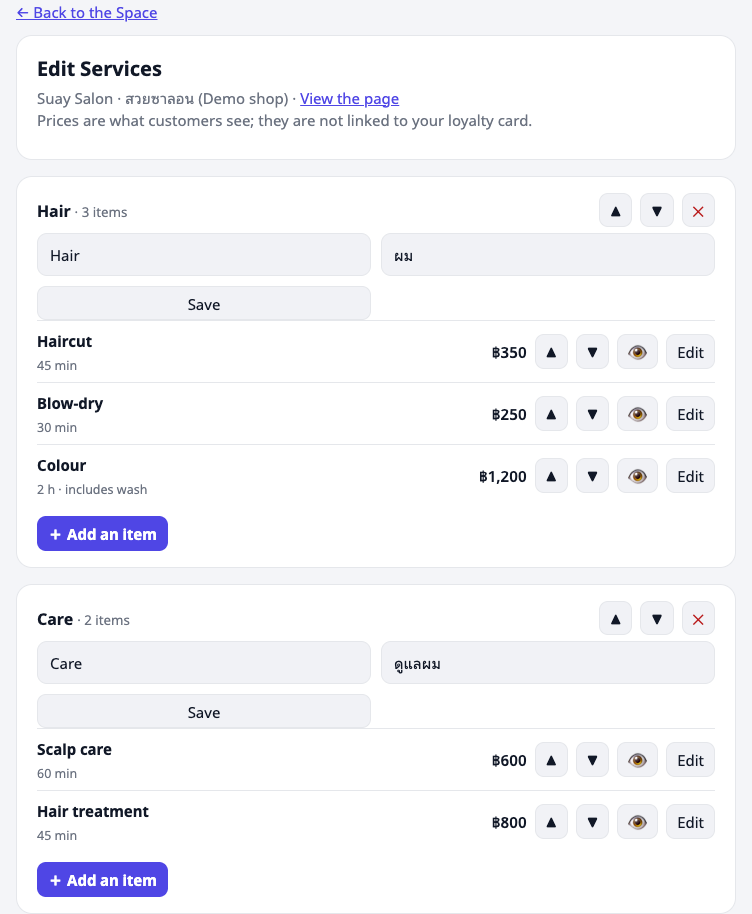
- Add a section (for example Coffee, Bakery) — name in English and Thai. Use ▲ ▼ to order sections; ✕ deletes a section and its items.
- Add an item inside a section: name (English / Thai), a short description, price, an optional photo, a tag (Popular or New) and Available.
- Price is in your shop currency (set it on the Business info page; Thai baht shows as ฿65). Leave it empty to show Ask us (for example "by quote").
- Photo: a picture of the food, drink or finished work. Do not show customers' faces.
- 👁 hides an item without deleting it (sold out). ▲ ▼ move it up or down in its section.
On the Home the block shows up to 6 items — items tagged Popular first, then your order — and See full menu opens the whole list. A shop that has not added anything yet shows a prompt to the owner only; customers see nothing.
💡 These prices are for customers to read. They are not connected to your loyalty card or what you charge at the till.
💡 Menu / Services works in every Business Space. Local shops works for every town (city-type Space): once a shop is approved, it appears in that town's card and tab — see Local shops.
Coming next #
Showing a member's own Stars, stamps and vouchers in the block (after signing in with IDUnify) is planned. Nothing to do now.