🎙 Mayor & executives
Announce for the mayor and executives
What Mayor Talk is #
🎙 Mayor Talk is a message from the mayor (or the executive) to the residents. It has its own chip in the Announce tab. There is no fixed day: some weeks there is nothing to say. Once a week without a Mayor Talk, the office managers get one gentle reminder, nothing more.
Your office writes it for you, or you write it yourself. Either way you decide what goes out.
Who the mayor is #
In ⚙️ Announce settings → Mayor the office types the username of the mayor's account (the account must be a member of the Space). If it is left empty, the Space owner is the mayor and approves.
Approve and send #
When staff finish a draft and press Send to the mayor for OK, you get one notification: a Mayor Talk waits for your OK. Open the Announce tab and the Mayor Talk chip (office staff with a role also see it under Drafts). The message is marked Waiting for the mayor.

- Read it. If you want a change, tell the staff member who wrote it: they edit the draft and send it again.
- Press Approve and send (อนุมัติและส่ง).
- Only then is it public. It appears in the Mayor Talk chip.
If you do not want it, simply do not approve it; ask staff to delete it. Nothing has gone out.
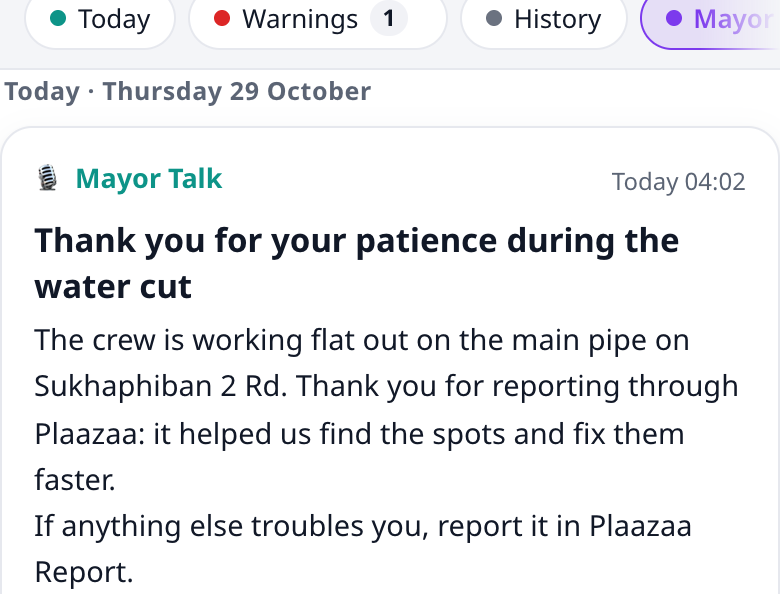
"Mayor · sent by the office" #
A Mayor Talk that staff wrote and you approved is shown to residents as Mayor · sent by the office (นายก · ส่งโดยสำนักงาน). It tells them honestly: the words are the mayor's, the office typed them. It is not shown as if you had posted it yourself.
Posting directly with your own account #
If you have your own account in the Space and you write a Mayor Talk yourself, it is published at once, in your own name: you are the author and the approver. The composer tells you: "You are the mayor here: it goes out under your name when you publish."
Nothing goes out in your name without your OK #
This is a rule of the tool, not a habit:
- Only the mayor can approve a Mayor Talk. Not even the Space owner, admins or announce managers, unless they are the mayor. If they try, they see "Only the mayor can approve a Mayor Talk."
- Staff drafts are invisible to residents until you approve.
- AI never writes or sends a Mayor Talk by itself. The 07:00 automatic draft is only for the neighbourhood status; auto-publish does not apply to Mayor Talk.
- No message is sent in your name before your approval; staff can only send it to you.
Example: thanking residents after the water cut #
- Staff write: Thank you for your patience during the water cut. The crew worked until the water was back to normal. They press Send to the mayor for OK.
- You get the notification and open Announce → Mayor Talk.

- You change nothing and press Approve and send.
- Residents now see it in Mayor Talk, labelled Mayor · sent by the office. It has no comments and no push notification: it is a message to read.
Questions #
Do residents get a notification? No. A Mayor Talk shows in the Mayor Talk chip. Notification is for the office to you (the approval request), not to residents.
Can residents comment? No. Mayor Talk has no feed post and no comments.
Can the office change my words after I approve? Managers can edit or delete a published message. Agree with your office that they will not change your words.
What if I am away? Nothing is sent. The draft waits. The office can also change the Mayor setting to another member.
Why did I not get the weekly reminder? The reminder goes to the office managers, not to the mayor.
Something is not working #
| What you see | What to do |
|---|---|
| No notification arrived | Open the Announce tab and look at the Mayor Talk chip. The draft may already be there. |
| No Approve and send button | Your account is not set as the mayor. Ask the office to check Announce settings → Mayor. |
| "Only the mayor can approve a Mayor Talk." | You are not the account set as mayor. |
| "That user is not a member of this Space." | The mayor's account must join the Space first (this appears in settings). |